How Each Display Technology Actually Works
Understanding the difference between OLED and LCD starts with one core question: where does the light come from?
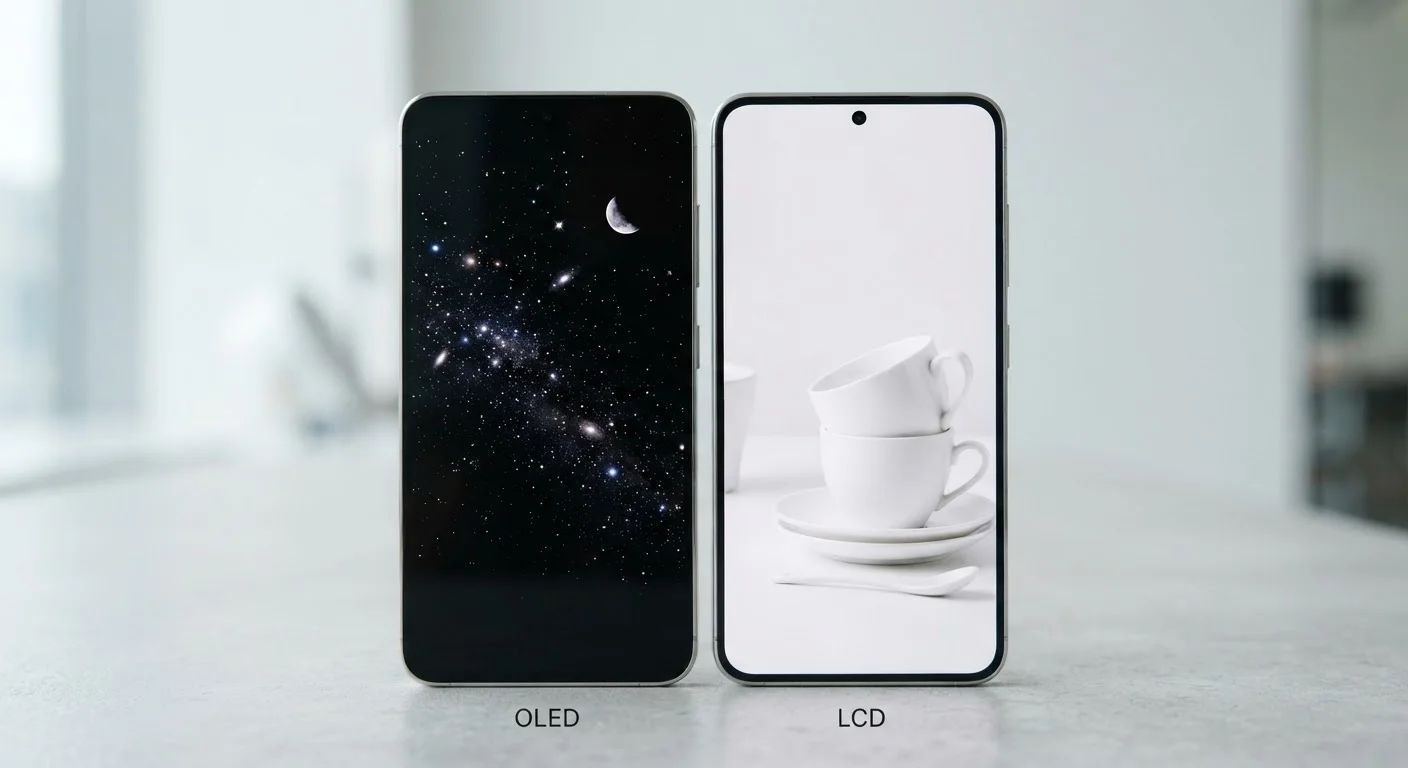
LCD - short for Liquid Crystal Display - works by shining a white backlight through a layer of liquid crystals that open or close to control how much light passes through, plus a color filter that adds hue. The backlight stays on continuously, which means even a pixel showing pure black still has light behind it. What you see as black is actually the liquid crystal layer blocking as much of that light as possible - not a perfect result.
OLED - Organic Light-Emitting Diode - works differently. Each pixel generates its own light. When a pixel needs to display black, it simply turns off entirely. No light, no leakage. That fundamental difference is why OLED screens can produce what's called an "infinite contrast ratio" - the gap between the brightest white and the darkest black is as wide as it can possibly be.
For everyday users, this distinction shapes nearly every visual quality you can perceive on your screen. See how this hardware-level difference connects to other spec choices by reading what phone specs actually mean.
Color, Contrast, and Brightness: What You'll Actually Notice
OLED panels tend to produce colors that pop - particularly reds and blues - because each pixel controls its own output precisely. Contrast is where OLED has the clearest advantage: true blacks make images look deeper and more cinematic. HDR (High Dynamic Range) content, which is common on streaming platforms, is designed to take advantage of exactly this kind of pixel-level control.
LCD screens, by contrast, can struggle with "backlight bleed," where light leaks around the edges of the panel or through areas that should appear dark. That said, LCD technology has matured significantly. Many modern LCD phones achieve very high peak brightness levels - sometimes exceeding certain OLED panels - which translates to better readability in direct sunlight.
| Criterion | OLED | LCD |
|---|---|---|
| Light source | Each pixel self-illuminates | Constant backlight panel |
| Black levels | True black (pixel off) | Dark gray (light blocked) |
| Contrast ratio | Extremely high | Good, but limited by backlight |
| Color vibrancy | Rich, sometimes oversaturated | More neutral; varies by model |
| Outdoor brightness | Good; varies by model | Often very high and uniform |
| Battery in dark mode | Lower power draw | Consistent regardless of content |
| Burn-in risk | Possible with heavy static use | Not a concern |
| Typical price tier | Mid to premium | Budget to mid range |
Color accuracy on both technologies depends heavily on how the manufacturer calibrates the display. An uncalibrated OLED can oversaturate colors to an unrealistic degree, while a well-tuned LCD can be more faithful to how content is meant to look. Some users prefer the punchy OLED look; others find it unnatural.
Battery Life, Burn-In, and Long-Term Considerations
One of the most practical OLED advantages is conditional: it only saves battery when displaying dark content. Because black pixels on OLED are powered off, enabling your phone's dark mode can meaningfully reduce power consumption. Light backgrounds - white email clients, bright websites - negate this advantage almost entirely, since those bright pixels are working at full power.
LCD power draw is more predictable. The backlight runs at a steady level regardless of what's on screen, so battery use is consistent across different apps and content types.
The main long-term concern unique to OLED is burn-in: when a static image (a navigation bar, a keyboard, a logo) is displayed at high brightness for extended periods, the organic compounds in those pixels can degrade unevenly. This leaves a faint ghost image visible even when the screen changes. Manufacturers use pixel-shifting and screen protection features to reduce this risk, but it remains a real consideration for heavy users. LCD panels do not suffer from burn-in.
Habits that quietly shorten your phone's lifespan covers how display settings and usage patterns affect hardware over time - worth a read if you're thinking about long-term care.
Which Screen Is Right for You?
There's no single correct answer here. OLED screens generally offer a more visually impressive experience for media consumption and low-light use. LCD screens remain a solid, durable option - particularly for users who prioritize outdoor visibility, screen longevity, or value pricing.
A few practical questions can guide your thinking: Do you use dark mode regularly? OLED benefits more from it. Do you work outdoors or in bright rooms? A high-brightness LCD may serve you better. Are you buying a mid-range phone where cost matters? Many strong LCD panels appear in that segment.
Display technology is just one part of how a phone performs day to day. If you want a fuller picture of how hardware choices connect, common smartphone myths worth knowing can help you separate marketing claims from what actually matters in real-world use.